Principal's Pen
Welcome to our distance learning. It has been lovely to connect with most of you.
There are still a few parents we are trying to contact so if you haven’t heard from a teacher at least once – that means we don’t have updated contact details for you. If you send an email to office@bishopdale.school.nz or text the school cell phone.
We may move to Level 3 lockdown at some point but the details are still being worked out as to what this means. When we know more we will make contact – in as many ways as we can. Our Facebook page – Bishopdale School – is now more active so make sure you are connnected through that. We are using it a lot as more parents seem to have access to it.
For those of you who still have no internet, the Ministry is also intending to connect you. However, in the meantime we understand Skinny is the best provider at present – although data caps have also been removed on Spark and Vodafone.
The plan is called Skinny Jump and families can sign up through one of the Skinny community partners listed on the website. I think the closest one is the Shirley Library. Go to the Skinny website but our local contact at the Shirley Library is Louise – 03 941 7923. The plan is 5 per month for 30gb and clients get a free modem delivered and have phone support from the library worker to set it up . There are no credit checks done and families can pay by the month and do not have to commit to a long term contract.
Filtering – please keep your kids safe – free internet filtering - www.switchonsafety.co.nz. This will block ‘unfriendly’ or inappropriate sites – but don’t forget to supervise your children on devices as well. All school devices sent out already have this filtering in place.
Where can you find more ideas to do:-
1. Educational TV channels - Papa Kainga TV can be live streamed here: https://www.tvnz.co.nz/livetv/home-learning-tv
2. Some of you will have received learning packs from the Ministry – these are yours to keep and work from.
3. Teachers work is sent either by email or through Google Classroom (Seniors).
4. Ministry website – Learning at Home.
5. Kiwi Can who teach our students once a week also have a YouTube channel which can be found at https://www.youtube.com/watch?v=OHdjmj6i_IQ&feature=youtu.be
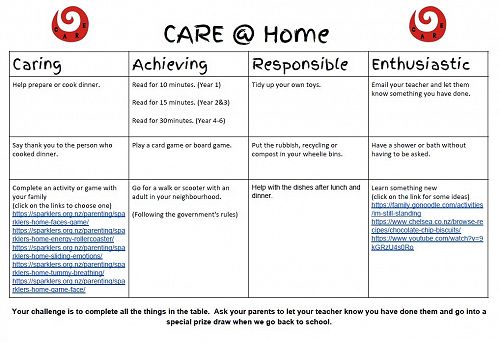
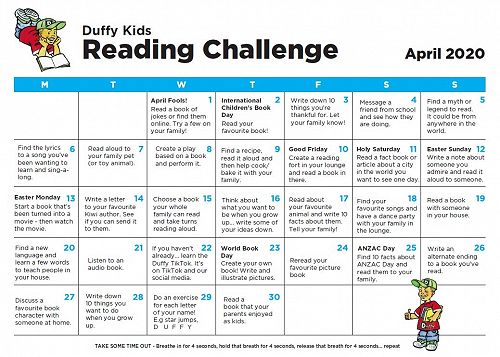
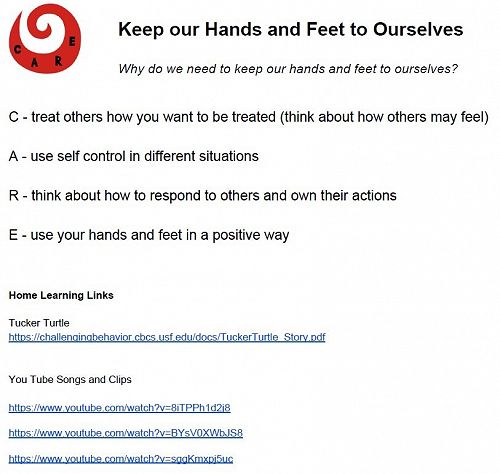
6. And we’ve put some more ideas below for you.
Gallery