Skool Loop - an App to change how we communicate
From next term on we are adding Skool Loop to the tools we use to communicate with you and you with us.
Skool Loop is specifically designed for use by schools and is used all over New Zealand.
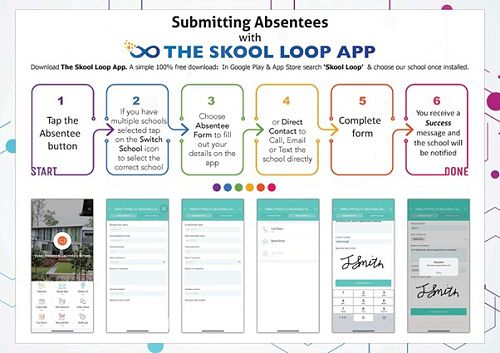
This app gives parents an easy way to let us know when your child will be absent from school. It gives you access to newsletters, notices, the school calendar and allows you to book times for events like parent teacher interviews.
Go the App Store or Google Play and download Skool Loop.
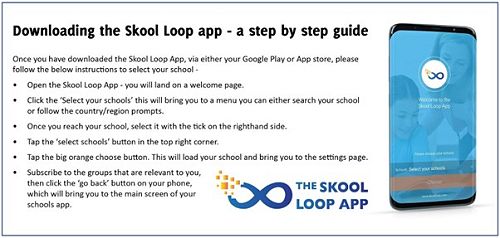
Follow these instructions to select our school.
- Open the Skool Loop App - you will land on a welcome page.
- Click the 'Select your School". This will bring you to a menu you can either search for our school or follow the region prompts.
- Once you reach our school, select it with a click on the right-hand side.
- Tap the big orange Choose button. This will load our school and bring you to the Settings page.
- Subscribe to the groups that are relevant to you, then click the 'Go back" button on your phone, which will bring you to the main screen of our school's app.
- As you can see below you can let us know if your child is absent via this app.
Please download this app over the holiday break. We will ask you to use it to book a time for a learning conference in week 3 of term 2.
Gallery