Too many emails? Tips and tricks for managing your Hero inbox
If you would like to take a Marie Kondo approach to your inbox - here are some tips that will "Spark Joy" when managing the incoming school messaging.
Schools are busy places. We love providing a plethora of outstanding opportunities, including extra-curricular learning and activities, for our emerging adolescents. We are aware that this will involve fairly steady traffic when it comes to communications, and we certainly don't want to be responsible for creating any messaging fatigue within our lovely school community.
A great feature of using Hero for our school communications is that there are a bunch of personalisable features for whānau to enhance their user-experience. This includes managing the flow of messaging to suit your needs.
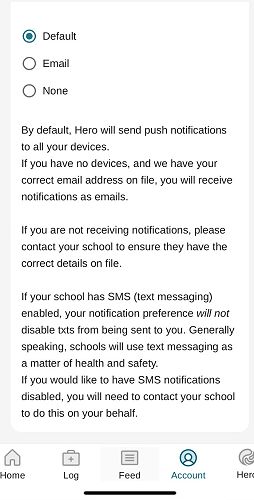
You can choose how you engage with the messaging by managing your own notifications. To access this feature, click on your own profile within the app - here you can select how you receive messages. (Please note that the default Hero setting is for users to receive an email and app notification when a message is sent to a user group their child is a member of).
You can change the settings to email-only, or no notification by selecting "none". If you select "none", you will no longer receive Hero emails in your inbox; you can therefore check the app, at your convenience, to ensure that you are getting all the messages that may impact your child.
Gallery