Internet safety - filtering
We have FAMILYZONE filtering software that sits across our internet and our devices.
Strong filtering and security are the reasons we insist that students access our material using only @tepuna.school.nz Google Accounts. This keeps children as safe as possible online - on any device, anywhere.
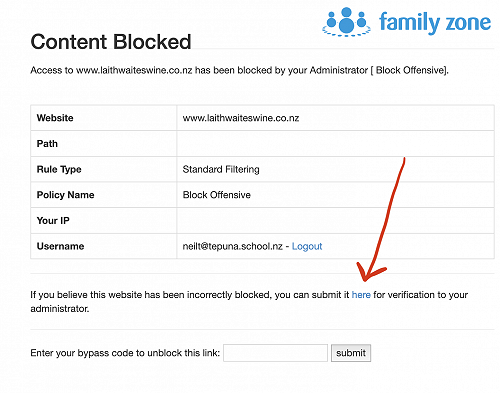
Occasionally the filters restrict legitimate pages too - so if this is something you experience, let us know. When a page is blocked, a message comes up giving the reason. There is a link to click to have the page reviewed and verified by an administrator. (see image below)
From last week:
There are things that parents and caregivers should remember to be aware of to try and prevent children and young persons from becoming victims and exploited online.
Discuss internet safety with children of all ages and agree with them on what they can do online including sites to visit and appropriate behaviours.
Some ideas are:
Ensure that children only access the Internet by signing in to their school google account -through Google Chrome- this way, on any device they are protected by the filters and settings we have applied.
Review and approve games and apps before they are downloaded Review privacy settings of sites and applications
Check your children’s profiles and what they are posing online and be aware that anything that is posted online with be permanently on the internet
Take the time to understand what sites they are visiting and who they are talking with and check in regularly
Some social media sites have age restrictions to join, check these before letting your child use them or join
Monitor your child’s use of the internet and consider having them use it in an open, common area of the house
Make sure your children know to report any activity they don’t feel comfortable with to you straight away.
Remember if your children were going out you would go with them or depending on their age check where they are going. If your children are online you should be with them or check what sites they are visiting.
If you think your child or a child in your care is the victim of online exploitation or abuse, please do not hesitate to report it. If we all work together to make sure children are safe online, we can make the internet a great tool for people of all ages.
Some good news to support you either working at home and/or studying at home - Spark, Vodafone, Vocus/Slingshot, 2Degrees and Trustpower have all advised they have removed their data caps and the possibility of any extra charges based on usage.
Gallery