2026 BYOC Information for Year 4-8 Whānau.
Seven years ago Marshland started its BYOC program (Bring Your Own Chromebook) for Years 5-8. In 2024 we extended our programme to include Year 4 tamariki and continue to offer this deal to whānau in 2026.
The reason we have a Chromebook as our chosen learning tool is outlined below. They are reliable, have good battery life, and are quick to load, not being slowed down by continual updates. Another reason for adopting this policy is that as a school, we can easily control and monitor Chromebooks.
A reminder that devices which are not Chromebooks will not be allowed to be used by any students involved with our BYOC programme.
It is recommended that all students moving into our Year 4-8 BYOC program purchase their own Chromebook. While this is not mandatory, it is recommended as your child will be using their device daily to support their learning.
If you choose to not buy a device there will be a small number of devices available in the hub. Our current uptake of student-owned devices is 95% across Years 5-8.
We are one of approximately 100 schools involved in the Manaiakalani Programme throughout New Zealand. They test a range of Chromebooks and come up with what they believe is the most robust and reliable device for students to use on a daily basis.
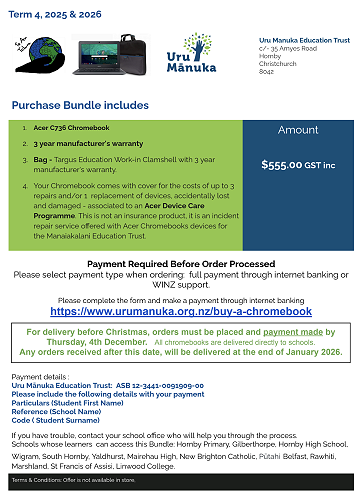
*The 2026 bundle price is $555 incl GST
Acer C736 Chromebook
3-year manufacturer's warranty *
Bag - Targus Education Work-in Clamshell with 3-year manufacturer's warranty.
Cover - Comes with cover for the costs of up to 3 repairs and/or 1 replacement of devices, accidentally lost or damaged.
PLEASE NOTE - There is a new system for repairs and warranties. Please click to see the new Acer Device Care Programme. This is not an insurance product, it is an incident repair service offered with Acer Chromebooks devices for the Manaiakalani Education Trust.
If you choose to take up this offer it will only be available through the school. Please go to this online portal to complete your order.
If you choose to purchase elsewhere please ensure your device meets our minimum requirements. Click here.
Your Chromebook must have 4gb of RAM as the 2gb cheaper version is too slow and won’t do the job for the 3-4 years you are expecting to have it.
At the end of the day, it is what your budget allows. Refer to the BYOC section of our website about minimum specs and do your homework.
Why are we doing this?
Having a Chromebook allows the school to manage the device, set restrictions, monitor usage and they are reliable. No updates, all day battery and fewer device issues allowing our teachers to teach and your child to learn.
Click here for Why Marshland manages your child's Chromebook
Your child's Chromebook will be managed by the school between the hours of 8:30 am and 3:30 pm Monday to Friday. This means we can set restrictions, monitor usage, and filter out explicit content. This system can also enable us to manage content when your child at home, by restricting use to student school accounts. If you would like this option, please contact Wayne Joyner - joyner@marshland.school.nz.
Parent and Whānau Frequently Asked Questions: Click here
Should you have any further queries, please do not hesitate to contact me at tyson@marshland.school.nz.
Paul Tyson
Deputy Principal
Gallery